
What players say
Azure Orb Survival strips away unnecessary complexity to deliver a pure reflex test. The health recovery mechanic adds a layer of strategy to what could be a simple click-fest. The visual design is clear and appealing, making it easy to focus on the action. Difficulty ramps up smoothly, keeping the game engaging without becoming frustrating too quickly. It is an excellent choice for players of all ages who enjoy fast-paced, skill-based challenges.
About this game
Core Gameplay Loop
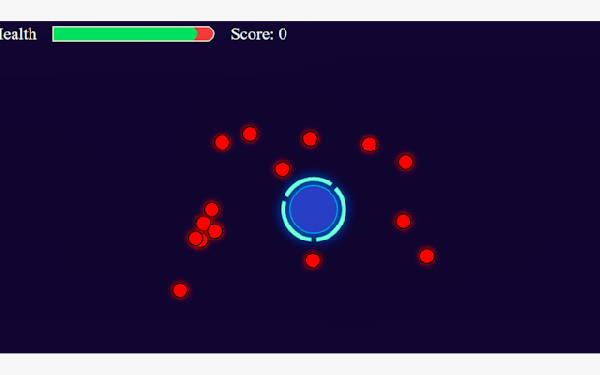
Players take on the role of a guardian protecting a luminous blue orb. The orb is stationary, and enemies stream toward it in unending waves. The primary action is clicking on each enemy before it makes contact. Every enemy that touches the orb reduces its health, while every enemy clicked away adds a small amount of health back. This creates a constant push and pull between offense and recovery. The game rewards players who can maintain a steady clicking rhythm and quickly assess which threats are most urgent.
Visual Style and Atmosphere
The game presents a clean, colorful aesthetic that is easy on the eyes. The blue orb glows against a simple background, making it the clear focal point. Enemies are distinct and easy to spot, even as they multiply. The visual design avoids clutter, allowing players to concentrate entirely on the action. This straightforward presentation makes the game accessible to younger players while still engaging for adults looking for a quick challenge.
Progression and Difficulty Curve
The game does not have levels or stages in the traditional sense. Instead, it uses an endless wave system where the speed and number of enemies gradually increase. Early waves move slowly, giving new players time to learn the controls. As time passes, enemies appear faster and from more directions. This gradual ramp-up ensures that players always feel a sense of improvement. The only goal is to survive as long as possible, with each session offering a new high score to beat.
Strategic Decision Making
While the controls are simple, the game requires strategic thinking. Players must decide which enemy to target first. Enemies that are closer to the orb pose an immediate threat and should be prioritized. However, clicking on a distant enemy might be easier and still restore health. This creates a constant trade-off between immediate safety and long-term health management. Skilled players learn to balance these factors, making each run feel unique.
Family-Friendly Design
The game is designed to be suitable for all ages. There is no violence or frightening imagery. The challenge comes from speed and accuracy, not from any mature themes. The controls are intuitive enough for young children to understand, yet the increasing difficulty provides a satisfying challenge for older players and adults. This makes it a good choice for family game time or for a quick break during the day.







Player Comments
Sign in to comment
You must be logged in before posting a review or rating.
No account? Create one
No comments yet. Be the first to comment!