
What players say
Arrow Tap Melody Match succeeds by keeping its focus narrow. The arrow-key input is crisp, the visual feedback is immediate, and the song selection offers a genuine progression from simple to challenging. Its open-source nature means the community can keep adding content, which extends replay value without diluting the core experience. For players who enjoy timing-based challenges and want something accessible yet demanding, this is a solid choice that respects your time and skill.
About this game
Core Gameplay Loop
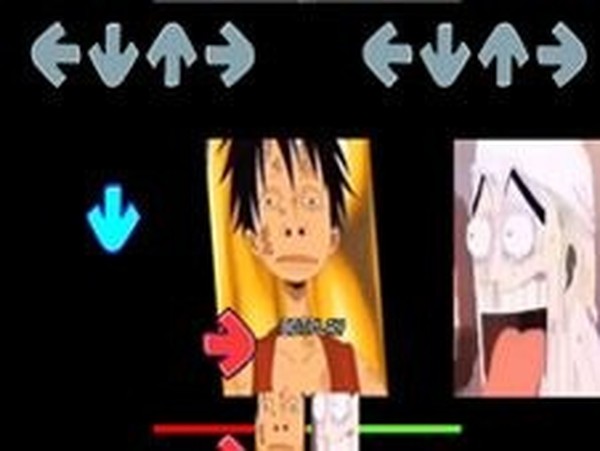
Arrow Tap Melody Match centers on a straightforward interaction: directional symbols scroll toward a target zone, and players press the corresponding arrow key at the right moment. Successfully hitting notes fills a progress bar on the player's side, while repeated misses cause the bar to shift against them. A streak of errors ends the round, requiring a restart. This core loop creates a clear tension between precision and endurance, rewarding consistent timing over speed alone.
Song Structure & Difficulty Curve
The game includes a selection of musical tracks, each with its own pattern of arrow sequences. Earlier songs feature slower tempos and simpler note arrangements, allowing newcomers to build confidence. Later tracks introduce faster rhythms and more complex patterns, demanding sharper reflexes and better pattern recognition. This gradual escalation ensures that players can develop their skills without feeling overwhelmed from the start.
Visual & Audio Design
The interface uses bright, saturated colors and clear on-screen indicators to keep the player focused on the action. Arrow symbols appear in a consistent lane format, making it easy to track upcoming notes. The audio tracks are upbeat and varied, matching the energy of each stage. The combination of responsive visuals and rhythmic audio creates an immersive environment where every correct press feels satisfying.
Community & Open Development
Arrow Tap Melody Match is built by a group of fans and released as open-source software. This means anyone can examine the code, suggest improvements, or create custom content such as new songs or visual themes. The open development model encourages contributions from players who want to expand the game's library or tweak its mechanics. This collaborative approach keeps the experience fresh and allows the community to shape its evolution.
Accessibility & Control Scheme
Only four keyboard keys are needed to play: the up, down, left, and right arrows. This minimal control scheme makes the game accessible on almost any computer without special hardware. The lack of complex menus or tutorials means players can jump directly into a round and start playing. For those who want to improve, the straightforward feedback system clearly shows where timing went wrong, making it easy to adjust on subsequent attempts.









Player Comments
Sign in to comment
You must be logged in before posting a review or rating.
No account? Create one
No comments yet. Be the first to comment!